
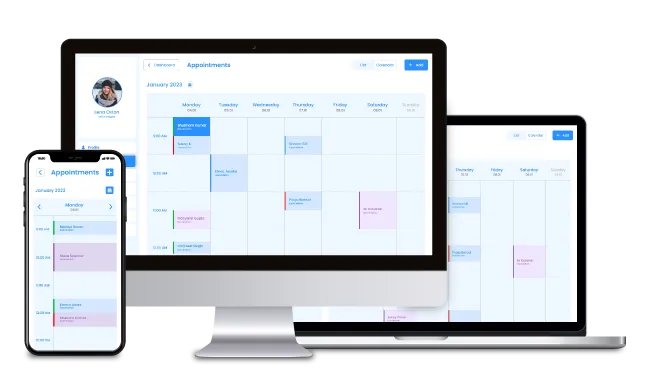
What Is Appointment Scheduling Software?
Key Features of Appointment Scheduling Software:
1. Automated Reminders
Appointment scheduling software can automatically send reminders to clients and employees via SMS or email. This feature helps reduce no-shows by ensuring clients remember their appointments, while also keeping employees informed of their schedules. Reminders can be customized in terms of timing (e.g., 24 hours before the appointment) and content, making it easier to maintain clear communication and improve overall efficiency.
2. Real-Time Updates
The software allows for instant modifications to schedules, ensuring that any changes—such as rescheduling or cancellations—are immediately reflected across the system. This prevents double-booking or missed appointments and ensures that both clients and staff are always working with the most up-to-date information. Real-time updates are particularly useful in dynamic environments where last-minute changes are common.
3. Customizable Calendars
Businesses can tailor their calendars to suit their unique needs, whether it’s setting specific working hours, blocking off unavailable times, or creating recurring appointments. Customizable calendars allow for greater flexibility and efficiency, ensuring that the scheduling system aligns perfectly with the operational requirements of the business. This feature is especially beneficial for businesses with varying service offerings or multiple locations.
4. Integration
The software can seamlessly integrate with other business tools such as Customer Relationship Management (CRM) systems, payroll software, or marketing platforms. This integration streamlines workflows by allowing data to flow between systems, reducing manual data entry and minimizing errors. For example, integrating with a CRM system can help track client history and preferences, while payroll integration can simplify employee time tracking and payment processing.
5. Analytics
The software provides valuable insights through analytics, enabling businesses to track key metrics such as employee attendance, appointment no-shows, and client booking trends. These insights help businesses identify patterns, optimize schedules, and improve overall productivity. For instance, if a high number of no-shows are detected, businesses can implement strategies like stricter cancellation policies or more frequent reminders to address the issue. Analytics also support data-driven decision-making, helping businesses grow and improve their services over time.
Why Businesses in the UK Are Turning to Appointment Scheduling Software
1. Improving Customer Experience
Modern consumers expect convenience and flexibility when interacting with businesses. Appointment scheduling software allows clients to book, reschedule, or cancel appointments online at any time, without the need for phone calls or emails. This self-service approach not only enhances customer satisfaction but also reduces the workload on staff. Additionally, features like automated reminders ensure clients stay informed, reducing the likelihood of missed appointments and improving overall service quality.
2. Enhancing Staff Productivity
Manual scheduling can be a significant drain on employee time and energy. Appointment scheduling software automates the process, freeing up staff to focus on more value-added tasks rather than managing calendars or handling booking inquiries. With real-time updates and centralized scheduling, employees can easily access their schedules, reducing confusion and improving efficiency. This is particularly beneficial for businesses with multiple staff members or locations.
3. Ensuring Compliance
In industries like healthcare, legal services, or finance, maintaining proper documentation and adhering to regulations such as GDPR (General Data Protection Regulation) is critical. Appointment scheduling software often includes features that ensure compliance, such as secure data storage, audit trails, and consent management. This helps businesses avoid legal risks and build trust with clients by safeguarding their personal information.
4.Reducing Operational Costs
Automating scheduling tasks reduces the need for additional administrative staff, lowering overhead costs. By minimizing errors, no-shows, and double-bookings, businesses can optimize their resources and improve revenue streams. Furthermore, the software’s analytics capabilities provide insights into operational inefficiencies, enabling businesses to make data-driven decisions that further reduce costs and enhance profitability.
Competitive Analysis: How Does It Compare to Other Solutions?
|
Feature
|
Appointment Scheduling Software
|
Manual Methods
|
Basic Scheduling Apps
|
|
Automation
|
Fully automated
|
None
|
Limited functionality
|
|
Ease of Use
|
User-friendly interface
|
Time-consuming
|
Varies by app
|
|
Employee Integration
|
Real-time syncing
|
Manual updates needed
|
Often lacks enterprise-level integration
|
|
Customer Interaction
|
Online booking, reminders
|
Requires phone calls
|
Typically lacks flexibility
|
|
Analytics and Reporting
|
Advanced insights
|
Manual calculations
|
Basic reporting
|
Competitive Edge:
-
Online Employee Scheduling App: Unlike basic apps, appointment scheduling software provides industry-specific solutions tailored to call centers, retail, healthcare, and more.
-
Employee Scheduling Software Call Center: For call centers, these tools minimize shift overlaps, manage peak times, and reduce agent burnout.
-
Best Appointment Scheduling Software for Small Business: Small business owners benefit from intuitive dashboards, low-cost subscriptions, and scalability.
Real-World Applications in the UK
1. Call Centers
-
Shift Optimization: Automate agent schedules based on call volume predictions.
-
Reduced Downtime: Ensure all shifts are adequately staffed, minimizing idle time.
-
Compliance: Maintain adherence to UK labor laws and GDPR regulations.
2. Small Businesses
-
Maximize Bookings: Allow clients to book slots 24/7.
-
Upsell Services: Use automated reminders to promote additional services or discounts.
-
Efficient Resource Allocation: Avoid overbooking or double-booking issues.
3. Healthcare Clinics
-
Patient Management: Schedule patient visits, follow-ups, or telehealth consultations.
-
Data Security: Comply with GDPR and other data protection regulations.
-
Reduced No-Shows: Automated reminders help ensure patients arrive on time.
How to Choose the Right Appointment Scheduling Software
-
Features:
-
Real-Time Updates and Reminders: Ensure the software provides real-time scheduling updates to avoid double-booking or missed appointments. Automated reminders (via SMS or email) are also crucial for reducing no-shows and keeping both clients and staff informed.
-
Integration Capabilities: Check if the software can seamlessly integrate with your existing tools, such as CRM systems, payroll software, or marketing platforms. Integration streamlines workflows, reduces manual data entry, and ensures consistency across systems.
-
-
Scalability:
-
Suitability for Team Size: Consider whether the software is designed to accommodate your current team size, whether you’re a small business or a large enterprise. Some platforms are better suited for smaller teams, while others are built to handle complex, multi-location operations.
-
Growth Potential: Choose a platform that can grow with your business. As your business expands, the software should be able to handle increased demand, additional users, and more complex scheduling needs without requiring a complete overhaul.
-
-
Cost:
-
Transparency in Pricing: Look for clear pricing structures without hidden fees. Some providers may charge extra for features like advanced analytics or additional integrations, so it’s important to understand the full cost upfront.
-
Free Trials and Payment Plans: Opt for software that offers a free trial or demo, allowing you to test its functionality before committing. Flexible payment plans, such as monthly subscriptions or tiered pricing, can also help you manage costs effectively.
-
-
Usability:
-
User-Friendly Interface: The software should have an intuitive and easy-to-navigate interface. A clunky or overly complex system can lead to frustration and reduce adoption rates among your team.
-
Training Requirements: Consider how much training will be needed for your staff to use the software effectively. Ideally, the platform should be simple enough for employees to learn quickly, minimizing downtime and ensuring a smooth transition.
-
Benefits Backed by Data
|
Benefit
|
Percentage of Businesses Reporting This Benefit
|
|
Improved Customer Satisfaction
|
68%
|
|
Reduced No-Shows
|
54%
|
|
Increased Employee Productivity
|
62%
|
|
Cost Savings
|
45%
|